The working brief sets the direction. Rank Engine takes responsibility for developing it into a finished article.
Research, outline planning, successive drafts and editorial checks happen before delivery. Your requirements guide that process, alongside the evidence, structure and natural brand integration that make the article suitable for its intended publication. Most articles can be approved as delivered.
Revision Desk is your article review workspace. If you choose Content Approval, it brings your article, its sources and client feedback together, with tools to incorporate any particular messaging changes you want before publication.
Review the article and its research
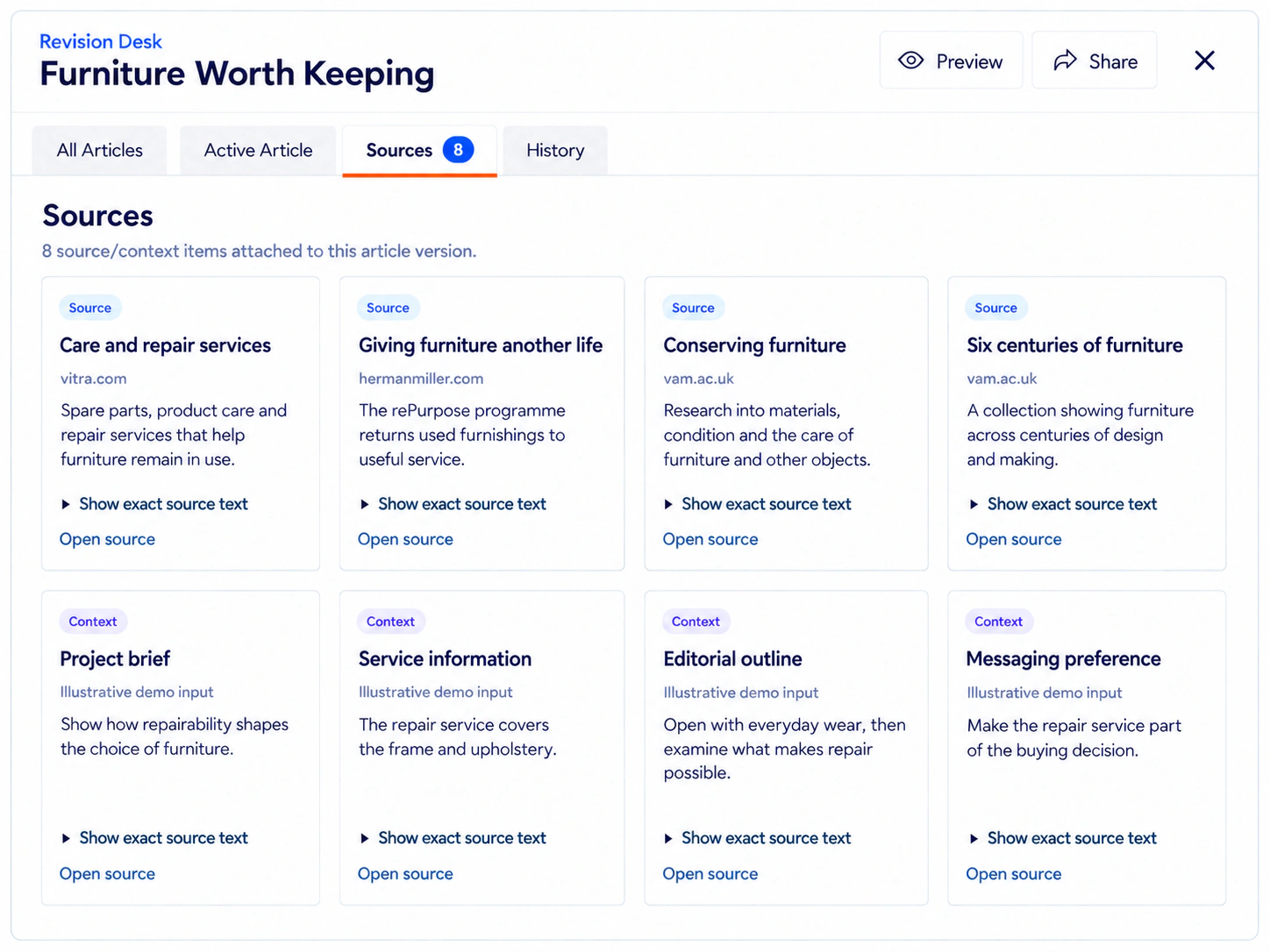
Open an article in Preview mode to read it without editing controls getting in the way. The Sources area keeps the material behind it close at hand: news items, expert insights, studies, research notes, source URLs, required links and media inputs.
You can explore the evidence behind a point or see how your brief informed the article without leaving the workspace. Previous versions remain available in the article history.
Invite client and colleague feedback
Share a review link with clients or colleagues so they can read the article and leave comments without creating a Rank Engine account.
Their comments stay with the article for you to process when you are ready. You choose which feedback to incorporate, make any changes and approve the final version. External reviewers can contribute their perspective without taking over editing or approval.
Refine a passage with its research in context
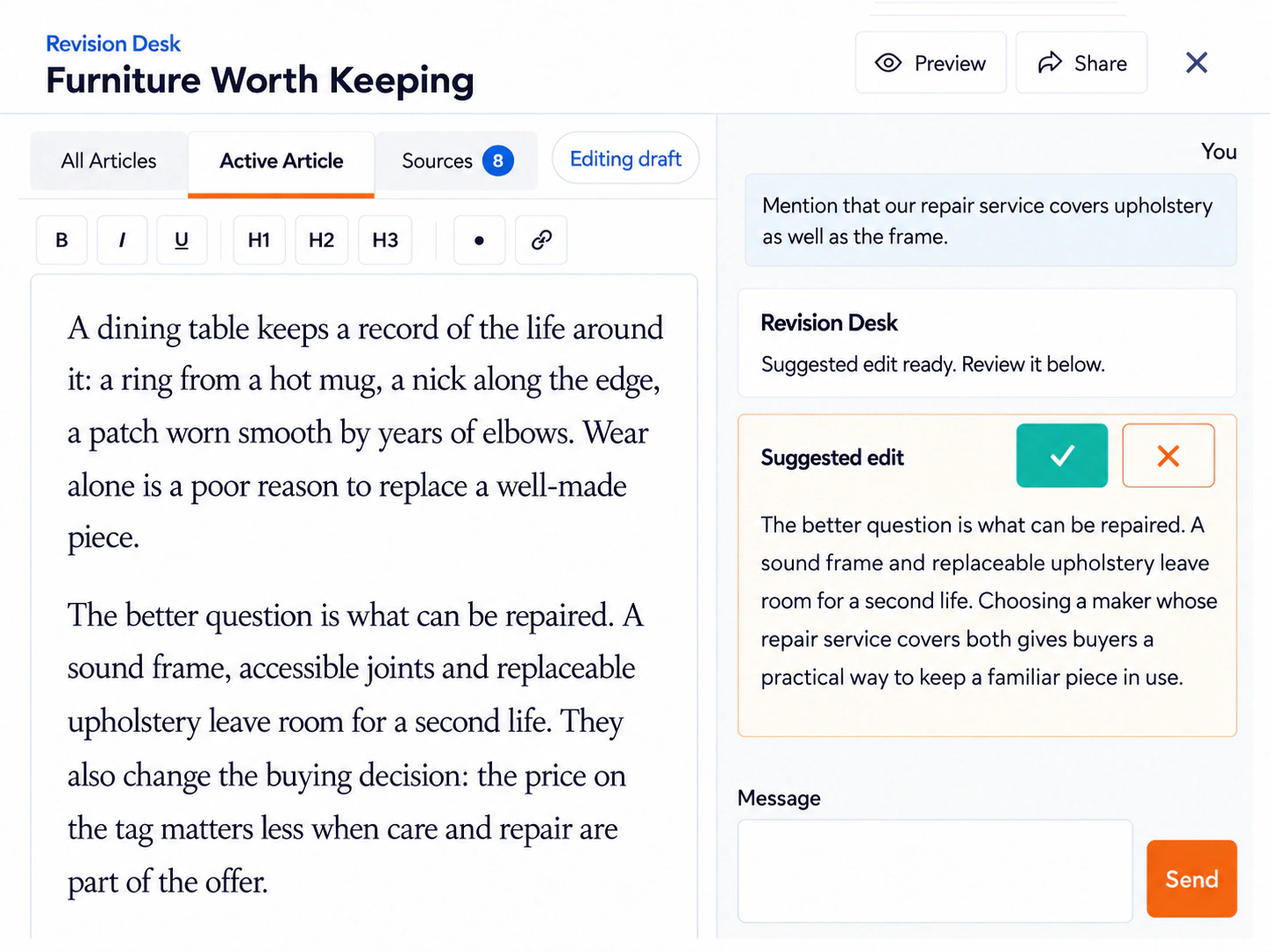
Select the text you want to refine and tell Revision Desk what you would like to change. It applies your instructions using the article's original research, source material, required links and campaign settings.
For example:
- "Use this updated description of our service."
- "Include this additional detail about our planning process."
The assistant can draw on the other articles in your order too. This helps it carry the same core positioning through different examples and phrasing, giving each placement its own contribution.
You can read the updated wording in the workspace and make further refinements before approving the article.
Make your own changes
When you already know the wording you want, switch into edit mode and change it directly. You might use a preferred product description, adjust how a service is presented or include an additional detail about your service.
Links can be edited by selecting text, opening the link tool and choosing or entering the URL. Save your changes, then return to Preview mode to read the updated article. Manual editing is free.
Work with your team without conflicting edits
Revision Desk also works with Rank Engine team accounts. Team members with access to the order can open the review under their own login.
Only one person can be the live editor for the order at a time. The first person to enter edit mode takes that role; other active viewers remain in Preview mode with a notice showing who is editing. The live editor can hand control to another active viewer.
Viewers do not see unsaved keystrokes. After the editor saves a draft, their preview refreshes to the latest saved version automatically.
Approve the article or request a different angle
Approve the article as delivered, or save your chosen messaging refinements before approving it.
If the angle itself isn't right for you, reject the article and explain the direction you'd prefer. With your order brief unchanged, we'll use that feedback to develop and deliver a replacement at no extra charge. This does not use your AI assistant allowance or Account Balance.
Reprocessing fees apply only if you change requirements after articles have been generated and new articles are needed. That could mean changing your background information, article brief or regional focus. We explain the fee before proceeding; see the Terms of Service for details.
Usage and charges
- Manual editing, comments and Content Approval are free.
- Each article includes 10 free AI assistant requests.
- Additional requests cost approximately €0.25 each and use your account balance.
See Pricing for current allowances and charges in your selected display currency.
See the full workflow
Revision Desk is your article review workspace. For the full journey from the working brief through research, website selection, publication and reporting, visit How It Works.